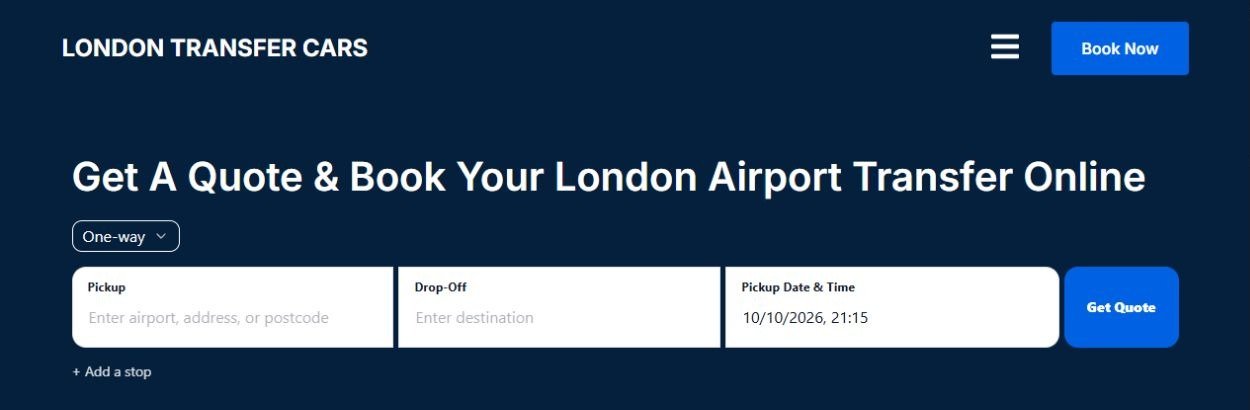
RouteOS adds online quotation and booking so customers can enter their journey, get a price, choose a vehicle and submit a booking directly through the website you already have.
Actual RouteOS inside a WordPress website. This is an example; the plugin adds booking to your existing site.
Quote
→
Vehicle
→
Booking submitted
Keep the website design. Add a direct booking path.
Your website may already be good
The missing part might simply be what customers can do on it.
A website can look professional and still make every customer contact you manually before they can book.
They ask for a price, send pickup and destination details, wait for a reply, ask about vehicle options and arrange the journey through messages or a call.
If your website already represents the business well, replacing it may make no sense. RouteOS lets you keep it and add a direct booking path.
Don’t rebuild what already works.
Add what’s missing.
A WordPress taxi booking plugin for businesses that want online quotes and bookings on their existing website.
The same website. A new booking path.
Turn a brochure website into a booking website.
Before RouteOS
01
Customer visits website
02
Reads about the service
03
Phones, emails or uses WhatsApp
04
Asks for a price
05
Waits for a reply
06
Operator replies
07
Booking arranged manually
With RouteOS
01
Customer visits the same website
02
Enters the journey
03
Gets a quote
04
Chooses a vehicle
05
Enters the booking details
06
Submits the booking
Phone, WhatsApp and email can stay. RouteOS simply adds another way for customers to book.
The customer side
Give customers a direct path from journey to booking.
RouteOS adds a structured quote and booking journey to your WordPress website. Customers can move through journey entry, vehicle selection and passenger details on your site.
Actual RouteOS booking interface
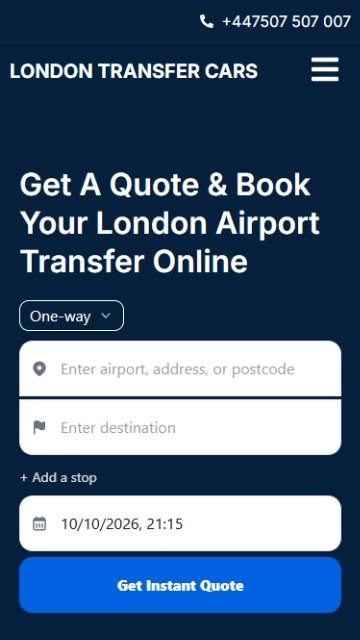
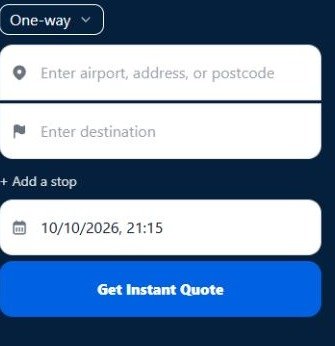
Journey entry and quote controls.
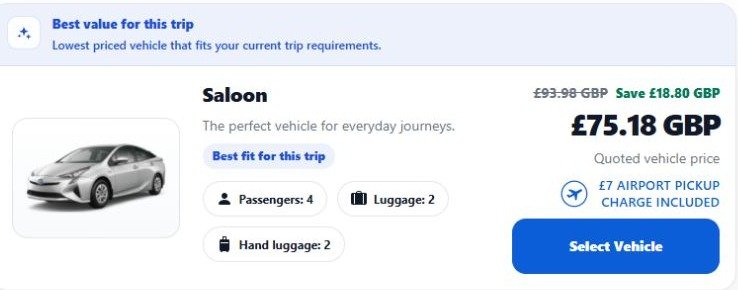
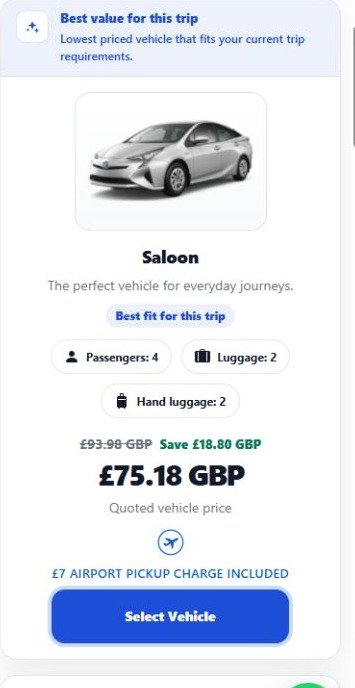
Actual vehicle quote for a sample airport-to-station journey. Fares depend on operator configuration.
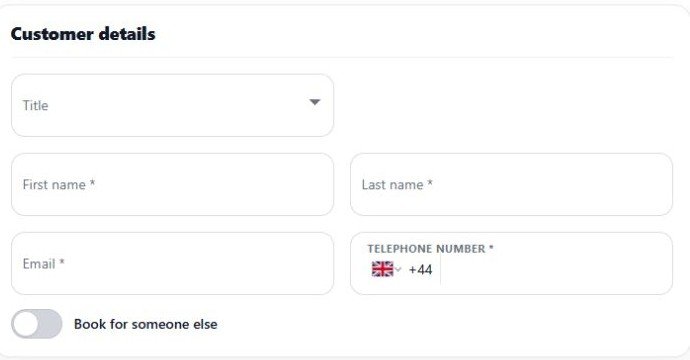
Actual passenger/customer fields, shown blank.
01
Journey
Pickup, destination, date and time.
02
Quote
A fare based on the operator’s configured rules.
03
Vehicle
An image, capacity information and quoted fare.
04
Passenger details
Customer, lead passenger and journey information.
05
Payment option
The payment methods enabled for the booking.
06
Submit
The booking is received for you to manage.
Date and time are collected with the journey. A booking being submitted or received does not necessarily mean it is confirmed. Any online payment is handled by the connected third-party provider.
Keep the channels that work
Already taking bookings by phone and WhatsApp?
Keep doing it.
Some people prefer to call. Some prefer WhatsApp. Others want to get a price and submit a booking without speaking to anyone. Give customers the choice.
RouteOS adds a booking channel. It doesn’t remove the ones already working for you.
Phone
+
WhatsApp
+
Website booking
↓
Your business
Keep your existing enquiry channels alongside RouteOS website booking. This does not imply a WhatsApp integration.
Configure your fares
Let the website quote around the way you price journeys.
RouteOS supports configurable fare rules so the online quote can reflect the operator’s pricing structure.
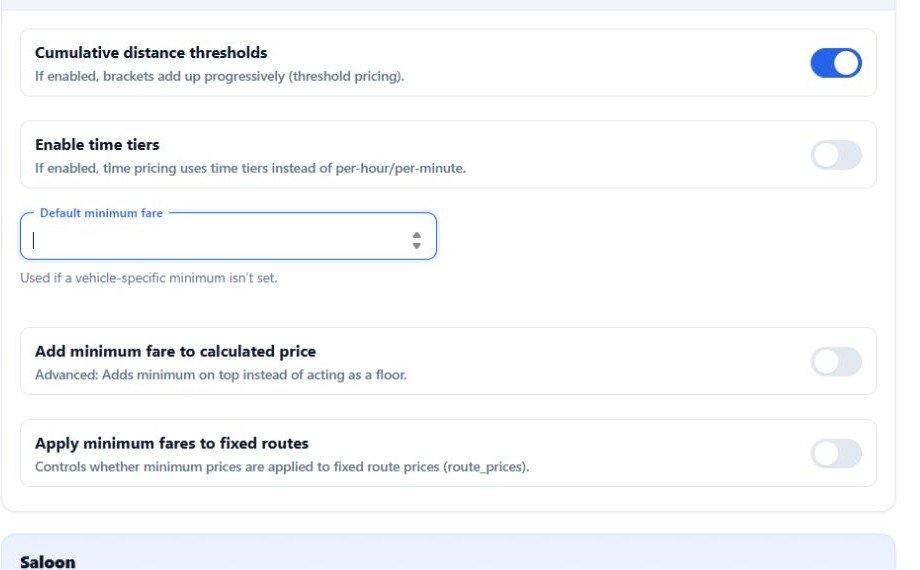
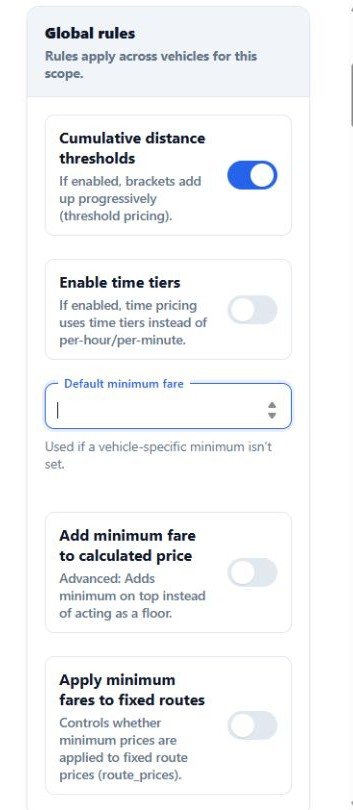
Fixed, distance and time. Configure route prices, per-mile and time-based fares, with minimum fares and vehicle-specific pricing.
Location, date, time and zones. Apply the supported rules and adjustments for your journeys.
Stops, extras and discounts. Configure additional-stop charges, item charges and discount codes.
Exact suitability depends on the way the individual operator prices journeys.
Actual RouteOS pricing controls, including minimum-fare settings.
CLIENT FEEDBACK
“Over the years I have spent over £5,000 trying to build a quote and booking system like RouteOS. I easily would have paid 4 times the price for RouteOS. It’s priced too low!”
Actual vehicle-selection UI. The vehicle, capacity information and fare shown are from a sample operator configuration.
Vehicle choice
Let customers choose the right vehicle.
Show the configured vehicle options with an image, vehicle type, passenger and luggage capacities, and quoted price.
Customers can compare the options for their journey before entering the passenger details.
These are configured vehicle categories, not a claim of real-time vehicle or fleet availability.
The operator side
The booking arrives in RouteOS for you to manage.
Once the customer submits their booking, the journey and passenger information enters RouteOS as a structured booking.
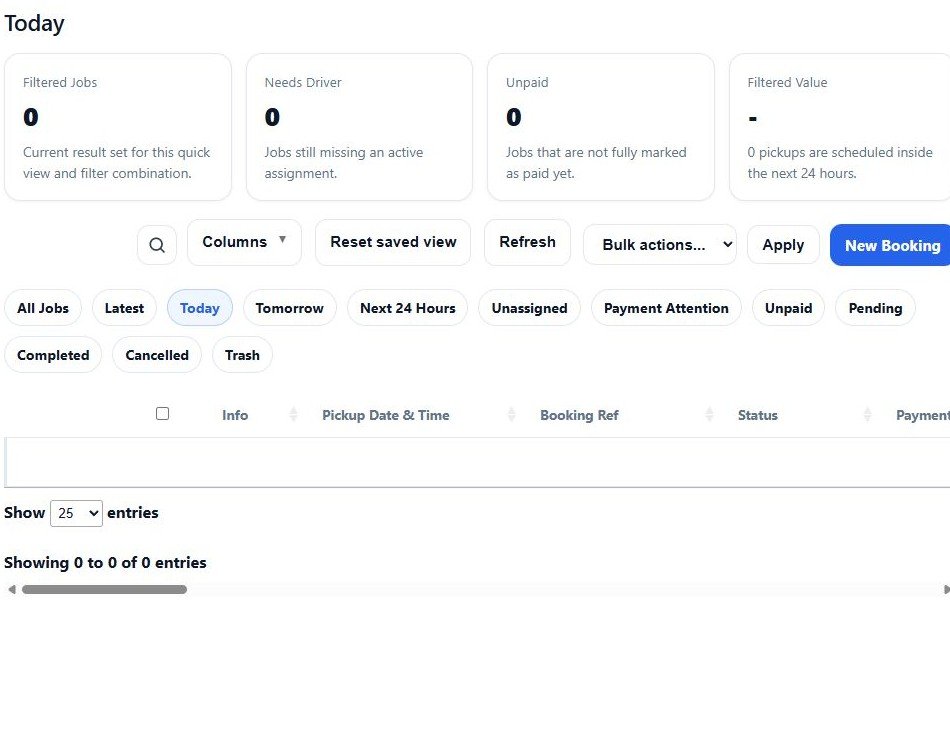
Actual RouteOS booking-management view. The Today filter is shown empty to protect customer records; the mobile crop focuses on its booking filters.
Review and edit
Open the booking, review journey and customer information, edit the details and add notes.
Handle the job
Change booking and payment statuses. Manually assign a driver and send the supported driver information.
Keep the record
Use invoice and receipt tools and view the booking in the calendar.
RouteOS provides booking management. The operator remains responsible for journeys and operational decisions.
You stay in control
Don’t want every online booking automatically accepted?
That’s fine. RouteOS supports a pending-booking workflow, so you can review the journey before confirmation.
Booking received
→↓
Pending
→↓
You review it
→↓
Confirm
Customers get the convenience of online booking while you keep control over the jobs you accept. “You review it” is an action; Pending and Confirmed are booking statuses.
Less repetitive data collection
Let customers enter the information themselves.
A booking enquiry can mean several messages about the destination, date, time, passengers, vehicle, return journey and pickup address.
RouteOS collects the configured booking information through the website instead.
Less repetitive data collection for you. A clearer booking process for the customer.
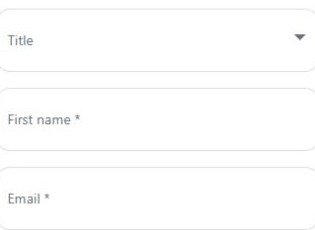
Actual customer information form. The mobile crop shows name and email fields.
Built for WordPress
Add RouteOS without giving up your existing website.
If your existing WordPress website already looks good and represents the business well, there is no reason to rebuild it just to add online booking.
RouteOS can be installed into a suitable WordPress setup and integrated into the site’s existing customer journey. Your existing pages, content and branding remain under your control.
Your existing website
+
RouteOS
+
Your hosting
Compatibility depends on the existing WordPress theme, plugins, hosting environment and configuration. The website should be checked before installation.
Self-hosted. One-off licence.
Your RouteOS installation runs with your WordPress website.
RouteOS Company Edition uses a one-off RouteOS software licence rather than requiring an ongoing monthly RouteOS software subscription.
One-off RouteOS software licence
No monthly RouteOS software licence. Your website and RouteOS installation run on your hosting.
Normal running costs can still apply
Website hosting, domain renewal, payment processing, SMS, mapping/API usage and optional development or customisation may have separate charges.
Services around your booking setup
Connect the services your booking setup needs.
Enable the supported services that suit your booking process.
Mapping
Google Maps settings support location lookup and journey distance/time information for quotations. Google/API usage may carry separate charges.
Payments
Current payment configuration includes Stripe, PayPal and Cash/manual options. Connected third-party providers process online payments and charge their own fees.
Email and SMS
Configure booking-event emails and supported SMS notifications. SMS settings include Twilio and PureSMS; email delivery and SMS accounts/services may have their own charges.
WordPress
Add the customer quote and booking journey to a suitable existing WordPress website. Your current theme, plugin stack and hosting should be checked first.
Included functionality
What’s included with RouteOS.
The quotation, booking and management tools behind the customer journey.
Customer booking
Journey entry, including date/time
Online quotation and vehicle selection
Customer/passenger information and journey notes
Return journeys, via stops and extras where configured
Configured payment options and booking submission
Pricing
Fixed and distance/time pricing
Minimum fares and vehicle-specific pricing
Configured location/date/time/zone adjustments
Additional-stop and extra charges
Discount codes
Booking management
Bookings dashboard and individual booking details
Editing, booking status and customer information
Payment status and manual driver assignment
Booking notes and supported driver-details notifications
If the website is dated, difficult to use or no longer represents the business properly, a booking plugin may only solve half the problem. The complete Website + RouteOS package may make more sense.
Contact RouteOS to check your website and arrange the plugin installation.
Installation and setup
How installation works.
Setup is included for one suitable WordPress website. The compatibility check and agreed configuration come first.
01
Check the website
Confirm the existing WordPress theme, plugins, hosting and configuration are suitable.
02
Install RouteOS
Install the plugin into the suitable WordPress environment.
03
Configure
Set company details, vehicles, pricing, locations, notifications and supported integrations according to the purchased setup scope.
04
Add the booking experience
Integrate the customer quote and booking flow into the website.
05
Test
Test the configured customer booking journey before launch.
06
Go live
Customers can begin submitting bookings through the website.
The installation scope depends on the purchased setup and the existing website. No fixed installation time is promised here.
What the plugin helps with
RouteOS helps convert existing website opportunities. It doesn’t create traffic.
Adding online booking does not automatically bring new people to your website.
Visitors still need to arrive through Google, SEO, advertising, directories, referrals, social media, repeat business or other marketing. RouteOS helps with what happens next.
Traffic creates the opportunity.
RouteOS gives that visitor a direct path to book.
Questions before adding RouteOS
WordPress Booking Plugin FAQs
Answers about your existing site, compatibility, pricing and booking management.
Do I need a new website to use RouteOS?
No. If you already have a suitable WordPress website, RouteOS can be added without replacing the entire site.
Does RouteOS work with every WordPress website?
Compatibility depends on the existing WordPress theme, plugins, hosting environment and configuration. The website should be checked before installation.
Can customers get a price online?
Yes. RouteOS uses the operator’s configured pricing rules to generate supported journey quotes and display vehicle options.
Can customers book without calling me?
Yes. RouteOS gives customers a direct online quote and booking path through your website. A submitted booking can remain Pending for operator review.
Can I still take phone and WhatsApp bookings?
Yes. RouteOS adds a website booking channel; it does not require you to stop using existing phone, WhatsApp or email channels. This does not imply a WhatsApp integration.
Do I have to accept every online booking?
No. RouteOS supports a pending-booking workflow so the operator can review a booking before changing its status to Confirmed.
Can I configure my own prices?
RouteOS supports fixed and distance/time pricing, minimum fares, vehicle pricing and configurable adjustments. Exact suitability depends on the individual operator’s pricing structure.
Does RouteOS include dispatch?
RouteOS provides booking management and manual driver assignment. It is not an autonomous dispatch platform. The operator remains responsible for journeys and operational decisions.
Does RouteOS track drivers?
Live driver GPS tracking is not currently part of RouteOS. Driver records, manual assignment and a booking calendar should not be confused with a live fleet-tracking service.
Can customers pay online?
Yes, using configured supported third-party payment integrations. Current settings include Stripe and PayPal, alongside Cash/manual options. Available methods depend on configuration and provider charges may apply.
Is there a monthly RouteOS fee?
No. RouteOS Company Edition uses a one-off RouteOS software licence. Separate costs may apply for hosting, domains, payment processing, SMS, mapping/API usage and optional development or customisation.
What if I need a new website too?
Choose the Website + RouteOS package instead. It combines a professional WordPress website with RouteOS quotation, booking and the operator dashboard. See routeos.io/websites/ for the current offer. View Website Package →
How much is the plugin?
The RouteOS Booking Plugin is £299 one-off. Setup on one suitable WordPress website and six months of RouteOS updates and bug fixes are included.
Keep the website. Add RouteOS.
Give your existing WordPress website a direct booking path.
Let customers enter the journey, get a quote, choose a vehicle and submit the booking. Then manage it through RouteOS.